HGQ2 - High Granularity Quantization 2
Introduction
From the official documentation page:
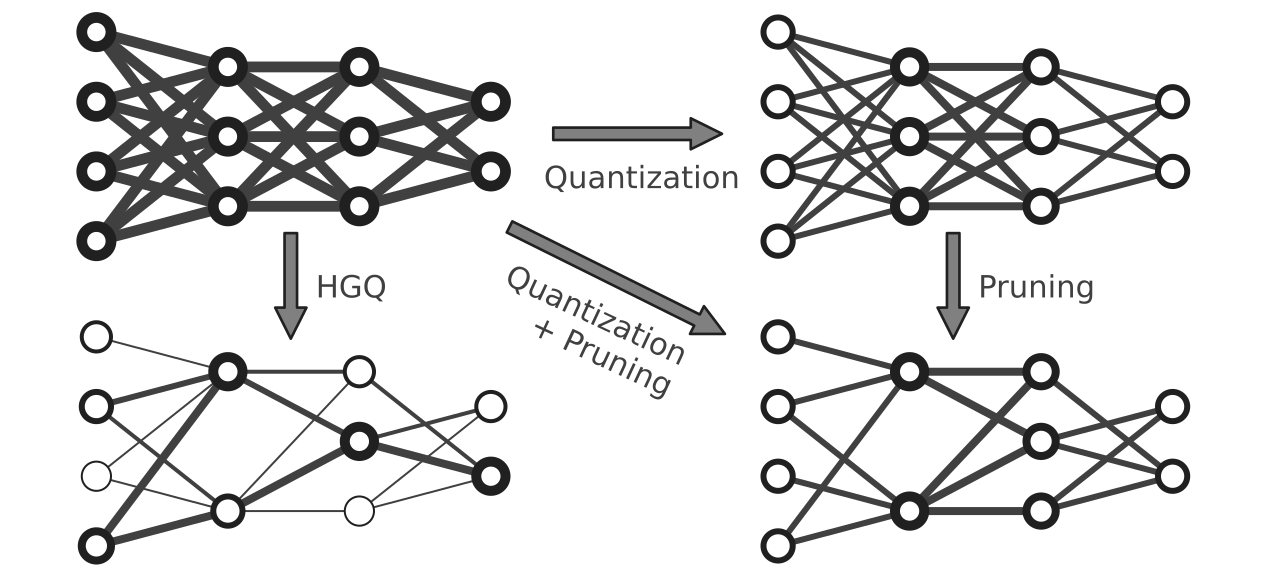
"HGQ2 (High Granularity Quantization 2) is a quantization-aware training framework built on Keras v3, targeting real-time deep learning applications on edge devices like FPGAs. It provides a comprehensive set of tools for creating and training quantized neural networks with minimal effort.
HGQ2 implements a gradient-based automatic bitwidth optimization and quantization-aware training algorithm. By leveraging gradients, it enables bitwidth optimization at arbitrary granularity, up to the per-weight and per-activation level."
Project github
Practical aspects:
- Implement your model using the layers provided by the library
hgq.layers(e.g.hgq.layers.Denseinstead ofkeras.layers.Dense). - Resource estimation is based on Effective Bit Operations (EBOPs), i.e., the upper limit of \(\text{LUT} + 55 \times \text{DSP}\) (
hls4ml). - The loss function includes a new term to optimize the bitwidths, weighted by the \(\beta\) parameter. The \(\beta\) parameter can be scheduled during training using the provided
BetaSchedulercallback, or set to a fixed value. - Provide a quantization configuration (see Configuration explanation) and enable EBOPs.
- Train your model as usual; if you are using a custom training loop, see Training strategy for the required small modifications.
Configuration explanation
HGQ2 provides two quantization methods:
kif: Fixed-point quantizer with integer and fractional bits. The bitwidth is determined by the sum of integer and fractional bits, plus one bit for the sign if the quantizer is signed (k parameter isTrue). This is the recommended quantizer for data (i.e. inputs and activations).kbi: Fixed-point quantizer with bit and integer parameters. The bitwidth is determined by the bit parameter (+ one bit if k isTrue), and the integer parameter is used to determine the quantization range. This is the recommended quantizer for weights.
Each layer can be configured with a QuantizerConfig object, which can be different for weights and activations, inputs and outputs (the last one is usually not necessary and must be enabled using enable_oq=True in the layer configuration).
E.g. for a Dense layer:
from hgq.layers import Dense
from hgq.quantizers import QuantizerConfig

dense_layer = Dense(
    units=32,
    activation='relu',
    kq_conf=QuantizerConfig(...),  # kernel (weights) quantizer configuration
    bq_conf=QuantizerConfig(...),  # bias quantizer configuration
    iq_conf=QuantizerConfig(...),  # input quantizer configuration
)
The QuantizerConfig object has many parameters; the most important ones are listed below:
q_type: quantizer type, eitherkiforkbi.place: where to apply the quantizer: one ofweights,bias,datalane,table. Ignored when theQuantizerConfigis passed to the layer configuration directly, as shown in the example above.k0: whether the quantizer allows negative values. Set toTruefor signed quantization; this will not change during training.b0,i0ori0,f0: initial bitwidth configuration, depending on the quantizer type. If the quantizer type iskif, specify the integer and fractional bits usingi0andf0. If the quantizer type iskbi, specify the bitwidth and integer bits usingb0andi0. These values will be optimized during training.round_mode: rounding mode to use: one ofRND,RND_CONV,TRN,S_RND,S_RND_CONV. See the table below for details on the rounding modes.overflow_mode: overflow mode to use: one ofWRAP,SAT,SAT_SYM. See the table below for details on the overflow modes.bc,ic,fc: constraints for the number of bits, integer bits, and fractional bits, respectively. These can be specified using the objects present inhgq.constraints:Min,Max,MinMaxto set minimum, maximum, or both minimum and maximum constraints. For example,b0=8, bc=MinMax(4, 8)will set the initial bitwidth to 8 and constrain it to be between 4 and 8 during training.heterogeneous_axis: the axes that are quantized heterogeneously. For example, to heterogeneously quantize the weights of aDenselayer, setheterogeneous_axis=(0, 1)to quantize each weight independently. For the bias quantizer, the heterogeneous axis is usually set to(0,)to quantize each bias term independently. For activations (or inputs), if heterogeneous quantization is desired, set it to(1,)to quantize each feature independently (not to(0,), which is the batch axis).
Other parameters are available for more advanced use cases; consult the documentation for QuantizerConfig for more details.
Rounding modes
| Round Mode | Name / Meaning | Behavior | Bias Characteristics | Example (value = 3.5) | Typical Use |
|---|---|---|---|---|---|
| RND | Round to Nearest | Rounds to the nearest representable value. If exactly halfway, rounds away from zero. | Slight bias away from zero | 4 | General-purpose fixed-point arithmetic when moderate accuracy is required and hardware cost must remain small. |
| RND_CONV | Convergent Rounding (Banker’s rounding) | Rounds to nearest value; ties (exact .5) are rounded to the nearest even number. | Minimizes statistical bias over time | 4 (since 4 is even) | DSP pipelines, long accumulations, filters, and ML inference where avoiding rounding bias across many operations is important. |
| TRN | Truncate | Simply discards the fractional bits (rounds toward zero). | Biased toward zero | 3 | Lowest-cost hardware implementations, early pipeline stages, or when quantization noise is acceptable. |
| S_RND | Symmetric Round to Nearest | Rounds to the nearest value with symmetric behavior for positive and negative numbers; halfway cases round away from zero symmetrically. | Balanced for ± values but still biased | 4 | Signed signal processing where positive and negative values should behave symmetrically (e.g., audio or baseband DSP). |
| S_RND_CONV | Symmetric Convergent Rounding | Symmetric rounding with tie-to-even behavior (banker’s rounding applied symmetrically). | Minimal bias across positive/negative | 4 | High-precision DSP chains or ML accelerators where both symmetry and minimal long-term bias are desired. |
In terms of hardware cost, the rounding modes are ordered from lowest to highest cost as follows: TRN < RND < S_RND < RND_CONV < S_RND_CONV. The choice of rounding mode can impact both the accuracy and hardware efficiency of the quantized model, so it should be selected based on the specific requirements of the application.
Overflow modes
| Overflow Mode | Name / Meaning | Behavior | Numerical Effect / Bias | Example (range [-8, 7], value = 9) | Typical Use |
|---|---|---|---|---|---|
| WRAP | Wrap-around (Modulo Overflow) | When the value exceeds the representable range, it wraps around using modulo arithmetic (two’s complement behavior). | No clipping; produces periodic overflow artifacts. | 9 → -7 | Hardware-efficient arithmetic such as address counters, phase accumulators, FFT pipelines, or intermediate DSP stages where modulo arithmetic is acceptable. |
| SAT | Saturation | Values exceeding the representable range are clipped to the maximum or minimum representable value. | Prevents overflow but introduces clipping distortion. | 9 → 7 | Common in DSP and ML inference where overflow must be prevented (e.g., accumulators, activations, image/audio processing). |
| SAT_SYM | Symmetric Saturation | Similar to saturation, but ensures the representable range is symmetric around zero (e.g., [-7, 7] instead of [-8, 7]). | Removes asymmetry around zero, reducing bias in signed computations. | 9 → 7 | Signed DSP algorithms, neural networks, or signal processing where symmetric behavior around zero is important. |
In terms of hardware cost, the overflow modes are ordered from lowest to highest cost as follows: WRAP < SAT < SAT_SYM.
WRAP is the simplest overflow mode and is implemented by simply dropping the most significant bits (MSBs) that exceed the target width. This corresponds to natural two’s-complement wrap-around behavior and is essentially free in hardware because it requires no additional logic such as comparators.
SAT requires detecting when a value exceeds the representable range. This typically involves comparators against the minimum and maximum limits and a multiplexer that selects either the computed value or the clipped boundary value, introducing some additional logic cost.
SAT_SYM behaves similarly to SAT but enforces a symmetric representable range around zero. Implementing this often requires extra logic to adjust the negative bound and ensure symmetry, which can slightly increase the hardware complexity and extend the critical path compared to standard saturation.
Training strategy
When using a custom training loop, the only required modification is to include the bitwidth optimization loss term in the total loss. In the train_step function, after computing the standard loss, add the term that HGQ adds to its layers computation, as in the example below (using the TensorFlow backend):
def train_step(self, data):
    ...
    with tf.GradientTape() as tape:
            # usual loss (in this case MSE)
            y_pred = self(x, training=True)
            loss = ops.mean(ops.square(y_true - y_pred))
            # add loss given by quantization (EBOPs), computed by the layers and stored in self.losses
            loss += sum(self.losses)

    # usual optimization step
    grads = tape.gradient(loss, self.trainable_weights)
    self.optimizer.apply_gradients(zip(grads, self.trainable_weights))
    ...
To set up the training loop, a set of callbacks is provided in hgq.utils.sugar that take care of various aspects:
BetaScheduler, used withPieceWiseSchedule, to schedule the \(\beta\) parameter during training. For instance, the following code sets \(\beta\) to 0 for the first 10 epochs, then grows linearly for the next 20 epochs until it reaches 1.0e-6, then decays exponentially to 1.0e-9 over the next 30 epochs, and finally remains constant for the rest of training:
from hgq.callbacks import BetaScheduler, PieceWiseSchedule

beta_schedule = PieceWiseSchedule([
    [0, 0.0, "constant"],
    [10, 0.0, "constant"],
    [30, 1.0e-6, "linear"],
    [60, 1.0e-9, "log"],
])

beta_scheduler = BetaScheduler(beta_schedule)
- The
FreeEBOPscallback tracks the EBOPs during training, displays them in the progress bar, and saves its history in the logs. - The
ParetoFrontcallback tracks the Pareto front of the models in terms of the target metric (e.g. accuracy) and EBOPs, and saves the best models on the front during training. This is useful for exploring the trade-off between accuracy and EBOPs after training. See its documentation for more details on how to use it and the available options.